Troops vs Passengers

Troops vs Passengers
Why is the troop car the same color as the passenger car? Its hard to tell in scenerios where I have to ship a specific number of troop cars. Can I make a global color change for the whole game myself? Or perhaps this can be changed in the next 1.06 patch?

My current project involves recoloring cars and adding some to the game. It would certainly be possible to create a unique "Troops" car, but I think the game by default just uses the Passenger car model and skin. Personally, I might go ahead and give this a try; I think Troop cars should be converted boxcars, at least from 1900 to 1950.
Basically, what has to be done is to hex-edit the cargo type file to point to a different car type, in this case making troops.cty refer to a "troopcar" or just "troop" (whatever you want to name it), rather than "pass" (passenger). This will force the game engine to look for all the assets related to "troopcar", and so you then need to copy all the 3DP, DDS, and other files necessary, placing them in UserExtraContent. It sounds simple, but it can get tricky if you're not careful.
I haven't tried it yet, but it seems like it might be possible to create a unique car type (i.e. skin) for every load in the game. I don't know if there is a built-in memory limit, though.
Basically, what has to be done is to hex-edit the cargo type file to point to a different car type, in this case making troops.cty refer to a "troopcar" or just "troop" (whatever you want to name it), rather than "pass" (passenger). This will force the game engine to look for all the assets related to "troopcar", and so you then need to copy all the 3DP, DDS, and other files necessary, placing them in UserExtraContent. It sounds simple, but it can get tricky if you're not careful.
I haven't tried it yet, but it seems like it might be possible to create a unique car type (i.e. skin) for every load in the game. I don't know if there is a built-in memory limit, though.
=Winchester, Paston & Portsmouth=
====== We Provide Pride! ======
====== We Provide Pride! ======
Okay, so now it is done!
-:- AND -:-
You can download it!
Yes, I went and created a Troop Sleeper car as a unique car, so that it could show a different paint scheme from the regular Passenger cars. This way, you can tell which of your trains are pulling soldiers on the main screen! I still haven't figured out a way to add cars, though, to the 2D interface; this is because there is one big image file that includes all of the 2D car sides, and there isn't room for more stuff.
Still, you might just want this for cosmetic reasons:
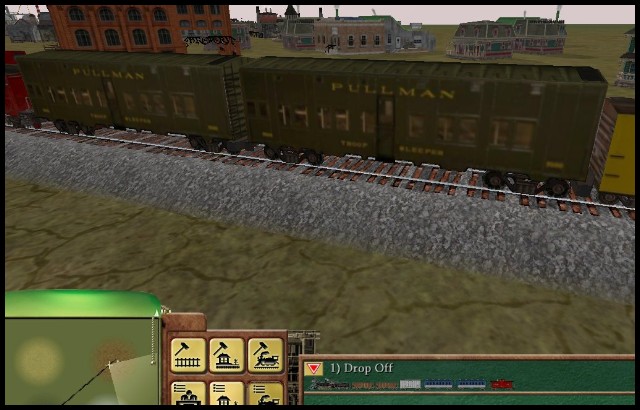
Go check out the full lineup on my web page (scroll down to the Rolling Stock section), and if you're brave, click on the download link and see it in action. Installing this mod, of course, will change a few files so please BACK UP any files before you over-write them!
http://wpandp.com/RRtycoon.html
I promise more downloadable cars will be coming in the next week or so.
-:- AND -:-
You can download it!
Yes, I went and created a Troop Sleeper car as a unique car, so that it could show a different paint scheme from the regular Passenger cars. This way, you can tell which of your trains are pulling soldiers on the main screen! I still haven't figured out a way to add cars, though, to the 2D interface; this is because there is one big image file that includes all of the 2D car sides, and there isn't room for more stuff.
Still, you might just want this for cosmetic reasons:
Go check out the full lineup on my web page (scroll down to the Rolling Stock section), and if you're brave, click on the download link and see it in action. Installing this mod, of course, will change a few files so please BACK UP any files before you over-write them!
http://wpandp.com/RRtycoon.html
I promise more downloadable cars will be coming in the next week or so.
=Winchester, Paston & Portsmouth=
====== We Provide Pride! ======
====== We Provide Pride! ======
When you say you cant add cars to the 2D interface, are you talking about the lower right hand corner picture of the train and its cars? That is what I wanted to be green instead of blue so its easier to tell which car is carrying what. If it cant be done, then I understand.
But your change on the 3D screen is awesome! Thank you!
But your change on the 3D screen is awesome! Thank you!
Re: Troops vs Passengers
Question: If we define overlapping eras for Troop or Passenger cars (or whatever car category for that matter), will we get a random mixture of older and newer cars in our consists for the given cargos?
If you have no Marxists in the leadership of your trade union, you have no trade union.
Abolish NATO and the (Na)zionist state !
Abolish NATO and the (Na)zionist state !

Re: Troops vs Passengers
Depends. If you mean passengers changing in 1900, and troops changing in 1910, then you'll get a mixture in those 10 years.
If you mean one era of troops ending in 1910 and another era starting in 1900, that won't work as far as I know. The second era will take precedence, so you'll only see one type of car.
If you mean one era of troops ending in 1910 and another era starting in 1900, that won't work as far as I know. The second era will take precedence, so you'll only see one type of car.
Complete express car and caboose packs - Custom double tankers (Alternative F era) - Pennsy H3 Consolidation
 Слава Україні! Героям слава!
 Слава Україні! Героям слава!
 Re: Troops vs Passengers
You are partially right. I just did some testing, and I only see one type of car, however not necessarily of the second era, but the alphabetically preceding car ! Before I get into more detail, I 'll wait to see if any reader will answer a small relevant quiz:
What is unusual in this screenshot , apart from the locomotives, and how was it achieved? Keep in mind, it is a genuine screenshot, no photo-montage whatsoever.
What is unusual in this screenshot , apart from the locomotives, and how was it achieved? Keep in mind, it is a genuine screenshot, no photo-montage whatsoever.
If you have no Marxists in the leadership of your trade union, you have no trade union.
Abolish NATO and the (Na)zionist state !
Abolish NATO and the (Na)zionist state !
-
RulerofRails
- CEO
- Posts: 2063
- Joined: Sun Dec 08, 2013 1:26 am
Re: Troops vs Passengers
That image is the size of an icon. 90x72. Maybe you made a new icon pack for the game?
Re: Troops vs Passengers
I can't see anything unusual about that screenshot. It would help if you told people what you think is unusual about it.
Complete express car and caboose packs - Custom double tankers (Alternative F era) - Pennsy H3 Consolidation
Слава Україні! Героям слава!
Слава Україні! Героям слава! Re: Troops vs Passengers
Icon 90x72 ? There seem to be problems with the photo service of google. Although I'd want to spare as much webspace and bandwidth from the forum itself, I'll repeat it here in reduced resolution. In case of visibility issues, it depicts simultaneous transport of passengers in 2 different coaches, Tycoon's default one and Holger Jürgenliemk's repaint.
I'll get back to it later, I must apologise for the moment to attend to some urgent professional matters.
- simultaneous transport of passengers in 2 different coaches
Re: Troops vs Passengers
That can happen at the change point between eras, when a train picks up a new consist at a station while other trains are still en route with older consists.
Complete express car and caboose packs - Custom double tankers (Alternative F era) - Pennsy H3 Consolidation
Слава Україні! Героям слава!
Слава Україні! Героям слава! Re: Troops vs Passengers
No, it's nowhere near the scheduled transition year. That's what I did:
Renaming the files while a session is running is useless, one must quit RR Tycoon altogether before renaming, and then reopen any appropriate sessions to do this.
I guess Holger's intention was, understandably, to be able to alternate easily between his car set and the default one, merely by alternating between his and the original "Passengers.cty" version.
- I installed Holger's "coach" set. This is intended to replace the default "passenger car" set, yet without overwriting it. Holger globally substitutes the "passenger car" reference with the "coach" reference. In this context, the cargo file "Passengers.cty" is modified to define "coach" as the matching car type instead of "passenger". His additional "coach" definition .car & .cgo files contain the same "coach" reference at the appropriate byte addresses, while Tycoon's default passenger car set contain the "passenger car" reference.
I was hoping that if I make the default passenger set usable in parallel with Holger's set, I would get rolling stock of both sets randomly appearing in train consists, in the same manner it happens with alternative municipal buildings of any given category. For this purpose, I edited the default passenger PassA.car & PassA.cgo files replacing the "passenger car" reference with "coach" to comply with this new term. Still, the default passenger car failed to appear in any consist alongside Holger's version, named coachA. Only when I temporarily renamed Holger's .car & .cgo files to demote them alphabetically (one could alternatively move these temporarily out of the data folder), did the old default car miraculously appear in the consists, proving the correctness of my modifications of the PassA.car & PassA.cgo files. - I saved the session, quit RR Tycoon and restored Holger's .car & .cgo files in their proper folder
- I loaded RR Tycoon again and reopened the above stored session again. The consist already underway still had the default passenger cars, since both car versions are valid under this setup.
- I scheduled a "Gegenzug" (I am not sure if there is a proper English term) to run from the other end of the route. Expectedly this one -and any train afterwards- would feature exclusively Holger's coaches once again.
- When both trains met at an intermediate point, I took the screenshot.
Renaming the files while a session is running is useless, one must quit RR Tycoon altogether before renaming, and then reopen any appropriate sessions to do this.
I guess Holger's intention was, understandably, to be able to alternate easily between his car set and the default one, merely by alternating between his and the original "Passengers.cty" version.
If you have no Marxists in the leadership of your trade union, you have no trade union.
Abolish NATO and the (Na)zionist state !
Abolish NATO and the (Na)zionist state !
Re: Troops vs Passengers
Ok. Yes you can do that trick too. I've often seen it happen during testing. It works with any cargo cars, but only until the trains pick up another consist at the next station. As far as I know there is no way of using it to have more mixing of consists. The game simply loads whichever cars are set at the time the train is at the station.
The renaming of assets is not to allow mixing of consists, but to prevent conflicts with existing files and so people will know which files do what. It can also be done for convenient grouping. For example, I name my custom cars the same as the cargo they carry, but with a lowercase x prefix. This keeps them all together in the relevant folder, since nothing else uses an x prefix.
The renaming of assets is not to allow mixing of consists, but to prevent conflicts with existing files and so people will know which files do what. It can also be done for convenient grouping. For example, I name my custom cars the same as the cargo they carry, but with a lowercase x prefix. This keeps them all together in the relevant folder, since nothing else uses an x prefix.
https://www.deepl.com/translator#de/en/GegenzugI scheduled a "Gegenzug" (I am not sure if there is a proper English term)
Gegenzug noun, masculine
countermove n
less common: counteroffensive n (sports)
·
oncoming train n
·
counter-attack n (sports)
·
breakaway n (sports)
·
opposite train n
·
cross-draught n
·
train in the opposite direction n [descr.]
Complete express car and caboose packs - Custom double tankers (Alternative F era) - Pennsy H3 Consolidation
Слава Україні! Героям слава!
Слава Україні! Героям слава! Re: Troops vs Passengers
I moved my thoughts on the Gegenzug subject here
If you have no Marxists in the leadership of your trade union, you have no trade union.
Abolish NATO and the (Na)zionist state !
Abolish NATO and the (Na)zionist state !